
App Monetization Strategy: Real-World Lessons & How I 2.5x Subscription Revenue
App Monetization: Failures, Successes, and Lessons Learned
Are you struggling to monetize your indie app?
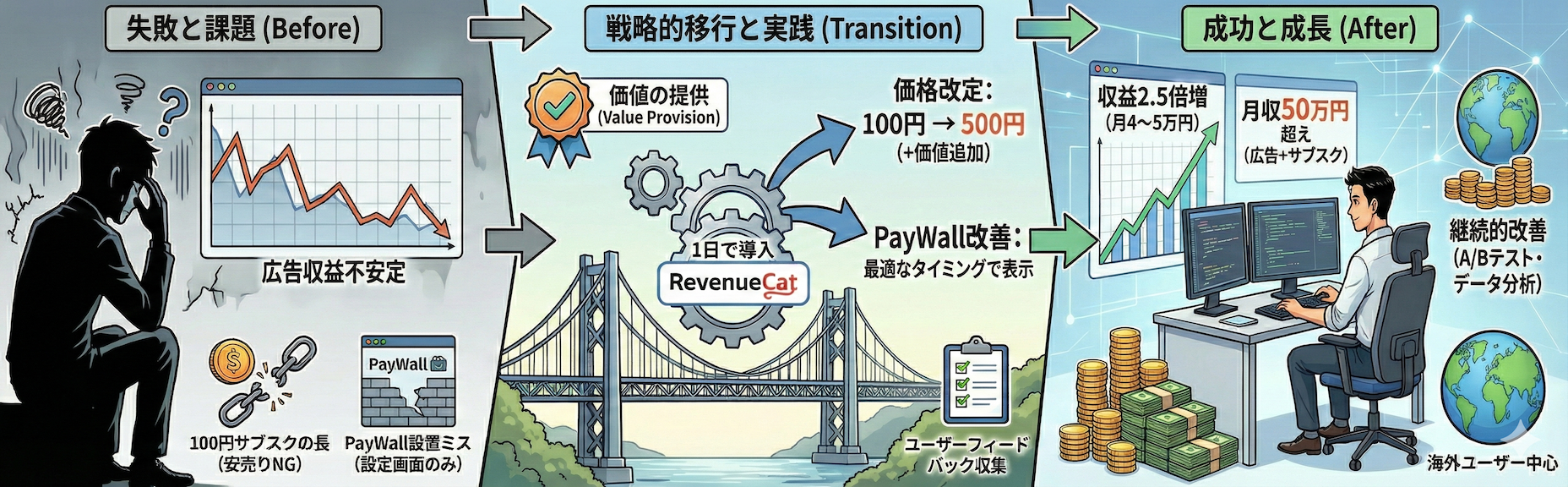
I develop tool and game apps as a side business, running an app with 30,000-40,000 monthly active users (MAU). I achieved $5,000-7,000/month from ads alone, and after implementing a subscription model, my subscription revenue increased from $100-200 to $400-500 per month—a 2.5x growth.
In this article, I'll share my real-world experience on "how to choose a monetization strategy" and "how to implement subscriptions," based on trial and error as an indie developer.
What You'll Learn
- Pros and cons of 3 monetization models: Ads, Paid, and Subscription
- Real revenue structure with 30-40K MAU
- Why I raised my subscription price from $1 to $5
- Step-by-step RevenueCat implementation (even beginners can do it in 1 day)
- PayWall implementation mistakes and improvements
Comparing 3 Monetization Models
The three main monetization methods for indie apps are: "Ads," "Paid (One-time Purchase)," and "Subscription." Let's examine each.
Ad Model: Free to Use but Unstable Revenue
Pros
- Low download barrier: Users can try the app for free, increasing downloads
- Continuous revenue potential: More active users = more ad impressions
Cons
- Unstable revenue: eCPM (revenue per 1000 ad impressions) fluctuates daily
- eCPM varies greatly by ad type, user country, and season
- My app fluctuates between $5,000-7,000/month
- Balancing with user experience: Reviews may complain "too many ads"
- However, revenue is necessary to continue providing the app for free
- If your app provides value, users will continue to use it even with ads
- Users will always complain about ads, but you don't need to take it at face value
- The key is to focus on increasing the app's value
- Consider adjusting particularly stressful placements, such as ads on app launch
Paid Model: Simple but Lacks Continuity
Pros
- Revenue confirmed upon purchase: Clear pricing for both developers and users
- Ad-free experience: Users enjoy the app without interruptions
Cons
- Lower initial downloads: Paid apps see significantly lower download rates vs free apps
- No recurring revenue: One-time sale means no long-term income
Subscription Model: Foundation of Recurring Revenue
Pros
- Predictable recurring revenue: Monthly/annual payments stabilize income
- Long-term user relationships: Creates a structure for continuous value delivery
Cons
- Higher initial barrier: Users often resist "monthly payments"
- Especially in markets where subscription culture isn't established
- Must deliver continuous value: Requires ongoing value that justifies the subscription
Conclusion: Combining Models is Optimal
In my experience, combining Ad Model + Subscription Model works best.
- Free users are monetized through ads
- Power users and ad-averse users are monetized through subscriptions
This approach allows optimized monetization for different user segments, maximizing revenue and diversifying risk.
My Actual Revenue Structure
Here's my current situation with tool/game apps:
App Scale
- Monthly Active Users (MAU): 30,000-40,000
- Genre: Utility tools, casual games
Revenue Breakdown
- Ad Revenue: $5,000-7,000/month (fluctuates)
- Main revenue source, accounting for over 90% of total
- Subscription Revenue:
- Before ($1 plan): $100-200/month
- Current ($5 plan): $400-500/month
- Approximately 2.5x growth from pricing change

User Demographics
Most subscription purchasers are users from the US and Europe. Subscription models are common in Western markets, where people are willing to pay for perceived value.
Meanwhile, the Japanese market shows stronger resistance, though I believe acceptance will gradually increase.
Subscription Pricing Strategy: Why Underpricing Fails
Failure Case: The $1 Subscription Trap
Initially, I offered a $1/month subscription for ad removal.
I thought "if it's cheap, many people will subscribe," but this was a big mistake.
Problems with Underpricing
- Revenue too low: Even with 100 subscribers, that's only $100/month
- Perceived as low value: Too cheap makes users think "it can't be that valuable"
- Unsustainable: Doesn't cover development and operation costs
Success Case: Raising to $5 and Adding Value
I then adopted the following strategy:
Pricing Change Points
- 5x price increase: $1 → $5
- Significantly increased value:
- Ad removal (as before)
- Added premium-only features
- Access to exclusive content
Results
- Revenue increased 2.5x+ ($100-200/month → $400-500/month)
- Improved user satisfaction: Users feel they're getting more value
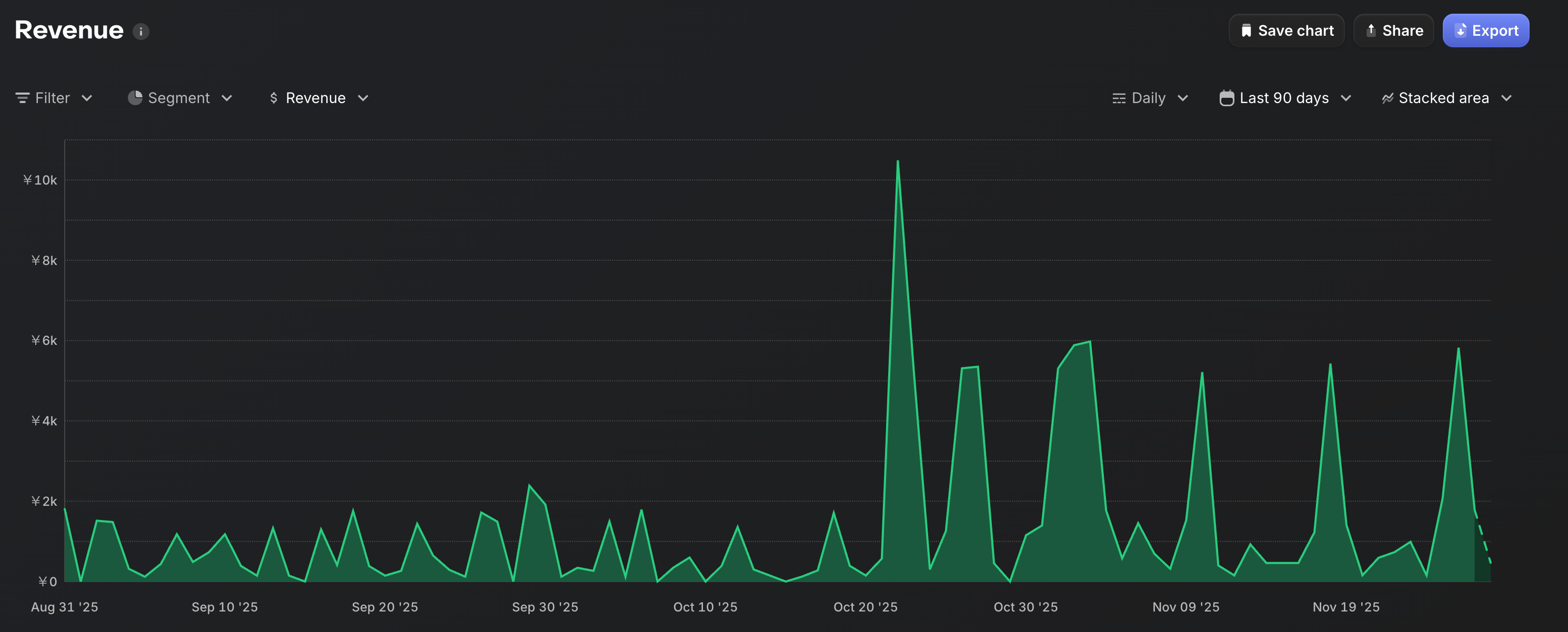
The graph above shows actual revenue data from RevenueCat. After raising the price to $5 around October 20, there's a clear increase in revenue. Before the price change, daily revenue ranged from a few dollars to $20, but after the change, daily revenue reached $50-100 on some days.
Pricing Lesson
Don't underprice—focus on increasing value
Users don't buy "because it's cheap," they buy "because it's valuable." If you provide value matching the price, users will happily pay $5.
This trend is especially evident in Western markets. Most of my app's subscription purchasers are overseas users who properly evaluate the value.
Is In-App Purchase Really Hard? 1-Day Implementation with RevenueCat
Do you think "implementing subscriptions seems difficult"?
Actually, using a tool called RevenueCat, implementing in-app purchases is surprisingly easy. I also felt intimidated by technical barriers, but in reality, I completed the implementation in about 1 day.
What is RevenueCat?
RevenueCat is a platform that centrally manages iOS and Android in-app purchase systems.
Benefits of RevenueCat
- Multi-platform support: Centrally manage both iOS (App Store) and Android (Google Play)
- Easy subscription management: Automatically handles renewals, cancellations, trials, etc.
- Rich analytics: Check revenue, churn rate, LTV, etc. in the dashboard
- Free to start: Free plan for up to $10K monthly revenue
5 Steps to Implement RevenueCat
Detailed implementation steps are clearly documented in RevenueCat's official documentation.
Reference: RevenueCat Sample Apps and Documentation
Step 1: Register Products in App Store / Google Play
Create "subscription products" in each store.
Step 2: Understand RevenueCat Basic Concepts
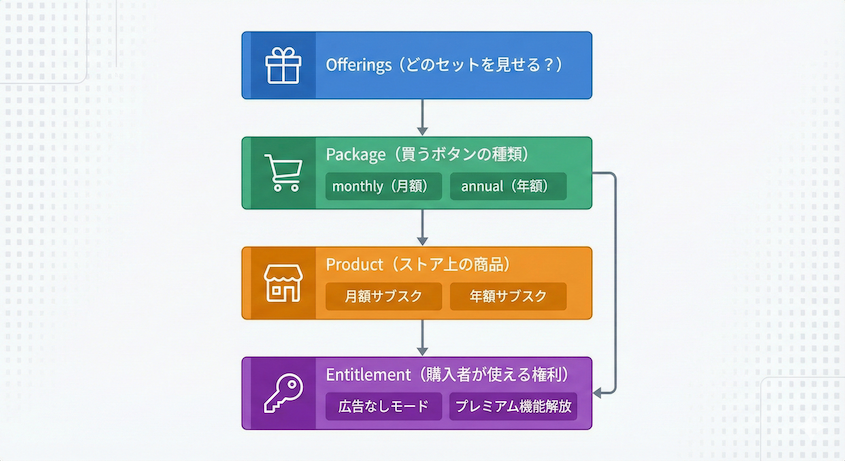
It's important to understand these 4 concepts in RevenueCat:
1. Product
The actual "item" sold in app stores.
Examples:
- Monthly subscription ($5)
- Annual subscription ($50)
- One-time ad removal ($12)
2. Package
Products grouped by "presentation." Think of it as the "purchase button" users see in the app.
Examples:
monthly(monthly package)annual(annual package)lifetime(one-time purchase package)
3. Entitlement
The "rights" granted to purchasers.
Examples:
premium(premium member)ad_free(ad removal)unlimited_access(unlimited access)
4. Offerings
A "set of packages" to display to users.
Examples:
default_offering(regular sales set)special_offer(sale set)experiment_A(A/B test set)
Step 3: Initialize the SDK
Initialize the RevenueCat SDK when the app launches.
// Flutter example
await Purchases.configure(
  PurchasesConfiguration("YOUR_PUBLIC_API_KEY"),
);
If you're using other languages or frameworks, check the RevenueCat official documentation for sample code in Swift, Kotlin, React Native, Unity, and more.
Reference: RevenueCat SDK Initialization Guide
Step 4: Fetch Offerings and Display Purchase Screen
Fetch Offerings → Packages → Products registered in RevenueCat and display options to users.
final offerings = await Purchases.getOfferings();
final packages = offerings.current?.availablePackages ?? [];

// Display monthly/annual options to users
Step 5: Purchase Process and Subscription Status Check
Purchase Process
Execute the purchase when the user taps a button.
final customerInfo = await Purchases.purchasePackage(package);
Check Subscription Status
When the app launches or a screen is displayed, check if the user is a premium member.
final customerInfo = await Purchases.getCustomerInfo();

final isPremium =
    customerInfo.entitlements.active.containsKey("premium");

if (isPremium) {
  // Display premium features
} else {
  // Show ads
}
Implementation Thoughts
The official documentation is excellent, so the technical barrier is lower than expected. Basic implementation can be completed in about 1 day.
The real challenge is the strategic aspect: "what value to provide."
PayWall Implementation: Failures and Improvements
A PayWall is a screen that acts as a "wall" to encourage users to subscribe. When placed correctly, it can significantly improve conversion rate (subscription rate).
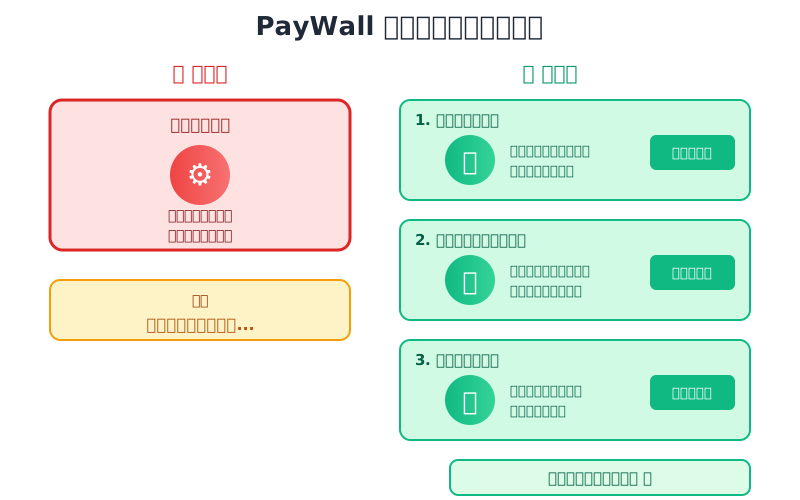
Failure Case: Only in Settings Screen
Initially, I only placed the PayWall in the settings screen.
Problems
- Hard for users to see: Only limited users open the settings screen
- Low purchase intent timing: Settings are opened to "adjust something," not to subscribe
Result: Almost no subscriptions.
Improvement: Show PayWall Before Ads or When Features Are Restricted
I now display the PayWall at these timings:
Best PayWall Timing
- Right before showing ads: Natural flow of "don't want to see ads? Then subscribe"
- When trying to use premium features: "Premium membership required for this feature"
- After using the app for a certain period: When users have experienced the app's value
PayWall Design Improvements
- Clear design: Simple UI that users can understand easily
- AI optimization: Use ChatGPT and other AI to efficiently create designs and copy
- Offer both monthly and annual options:
- Apply discount to annual plan (e.g., "Annual plan saves you 2 months!")
- Emphasize discount with percentage (e.g., "16% off")
Results
After improving PayWall placement and design, subscription rate significantly increased.
Advice for Sustainable Revenue Growth
Finally, here are the revenue optimization points I practice:
1. Regularly Collect User Feedback
Listen to user voices through reviews and surveys.
- "Too many ads" → Adjust ad frequency
- "Want this feature" → Add as premium feature
Understanding user needs is the first step to revenue improvement.
2. Stay Updated on Market Trends
Check competitor apps and industry trends.
- What monetization models do other apps use?
- What features are offered as premium?
Actively incorporate what you can learn.
3. Don't Underprice. Focus on Providing Value
Instead of lowering prices, focus on increasing the value you provide.
- Add features that make users think "I'd pay for this"
- Design special experiences exclusive to premium members
If there's value, users will happily pay.
4. Continue Optimization with A/B Testing
Test PayWall design, pricing, display timing, etc. with A/B tests.
RevenueCat has experimentation features, so you can make data-driven improvements.
5. Continuously Review Your Monetization Strategy
Monetization strategy isn't "set it and forget it."
- Changes in user count
- Ad revenue fluctuations
- Subscription churn rate trends
Regularly check this data and flexibly adjust your strategy—this is the key to success.
Summary: Key Lessons from Monetization Trials and Errors
In this article, I've shared my real trial-and-error monetization strategy without holding back.
Key Points
- Ads + Subscription combination is most balanced
- Underpricing fails. Focus on providing value
- In-app purchase implementation takes 1 day with RevenueCat. Technical barrier is low
- PayWall placement and design are crucial. Display at the right timing
- Continuous improvement increases revenue. Flexibly adjust strategy based on data
Monetizing indie apps isn't easy, but with the right strategy and implementation, results will come.
I hope this article helps those challenging indie app development as a side business.
Let's work hard together!